Auditing Service Orders for Billing

Contents
Auditing Service Orders for Invoicing & Posting Invoices for Accounts Receivable
The following tutorial example assumes the following conditions:
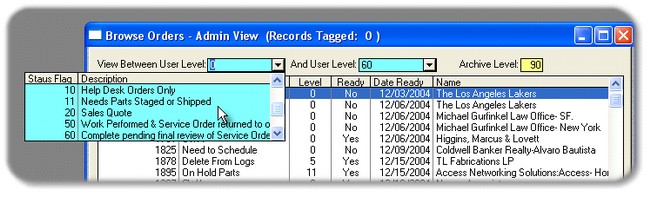
| 1. | Orders that have been completed, but are waiting on the final paperwork have been given a STATUS of Work Performed, which have View Level of 50; |
| 2. | Orders that have been completed and final paperwork has been turned-in, plus the necessary data-entry has been done have been given a STATUS of Complete, which have a View Level of 60; |
| 3. | Orders that have been reviewed and audited are assigned a STATUS of Ready to audit/bill, which have a View Level of 70; |
| 4. | Orders that have been Billed/Invoiced audited are assigned a STATUS of Post to Accounting, which have a View Level of 80; |
| 5. | Orders that should be retained or transferred the Customer History Log file are assigned a STATUS of Zip & Archive in Log, which have a View Level of 90; |
| 6. | Orders that should be deleted from the database are assigned STATUS of Delete From Logs, which have a View Level of 99. |
Using the above assumptions for Completing, Auditing and Invoicing, View the Service Orders between 70 & 70. Therefore, only the orders that are Ready to audit/bill shall appear in the Browse Table below:
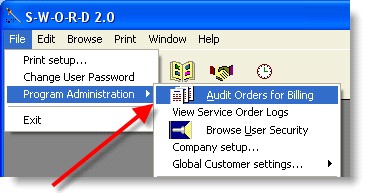
SWORD Service Orders can be easily updated from the Audit Billing Module, which can be found under the FILE menu option.
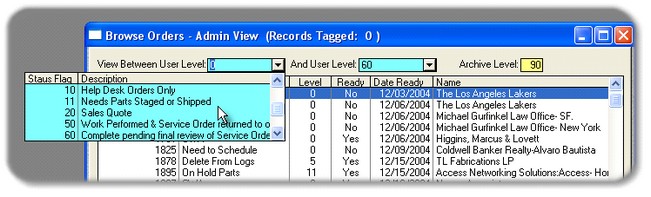
The Audit Billing Module which allows a Supervisor or System Manager to view all Service Orders, regardless of the View Level or Service Order Status.
Typical User Scenario:
| 1. | Your Service Writers and/or Dispatcher monitors SOs up to the Status Ready to Bill pending final audit (View Level 70); |
| 2. | Your billing and/or accounting personnel review/audit each SO for completion and correctness, then mark the SO to the Status Post to Accounting (Level 80). |
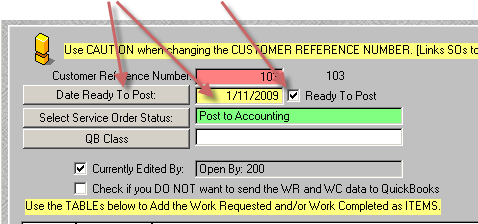
| 3. | User Tip: In order to transfer the SO to Quickbooks the Ready Column and field must contain a 'Yes'. In addition, the Date Ready Column and field must contain the appropriate date that the SO was made Ready. |
| 4. | The Ready field and Date Ready field can be posted manually inside the Administration tab of the SO Edit Screen. |
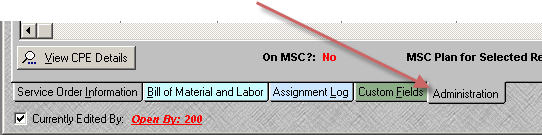
| 5. | The SO Ready Date field may be selected from a popup calendar or entered and the Ready to Post may be checked; Checked shows 'Yes' and Unchecked shows a 'No' on the SO Audit/billing table. |
| 6. | User Tip: Alternately, the marking and dating of SOs that are ready to post may be completed in a batch process. The SO must have a Status of Post to Accounting (Level 80). |
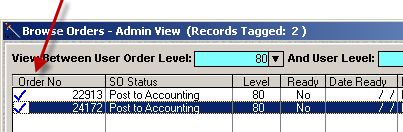
| 7. | Once the SO is saved with a Status of Post to Accounting (Level 80) the SO record may be tagged with a Check by mouse clicking into the white space to the left of the Order No in the Order No column. |
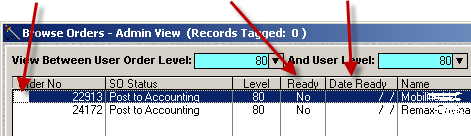
| 8. | You may tag as many SOs that are ready to Post to Accounting as needed. |